FOR SCREENWRITERS & STORYTELLERS
Your virtual corkboard. Scene cards, structural beats, character tags, drag-and-drop ordering. Export to Fountain, PDF, or print real index cards. Find the layout that fits your process.
START FREE. NO CREDIT CARD. · WHEN YOU'RE READY, PRO IS $9/MONTH.
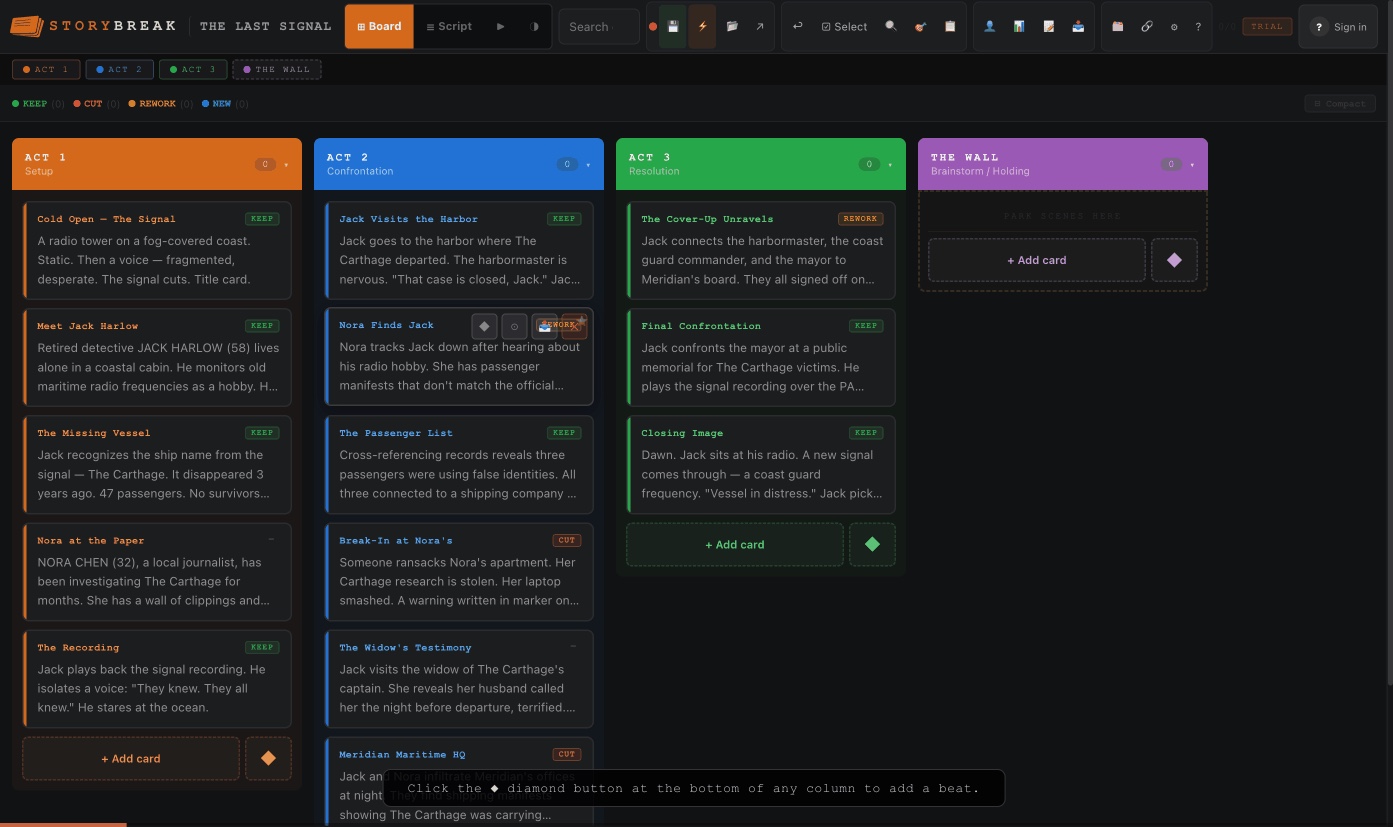
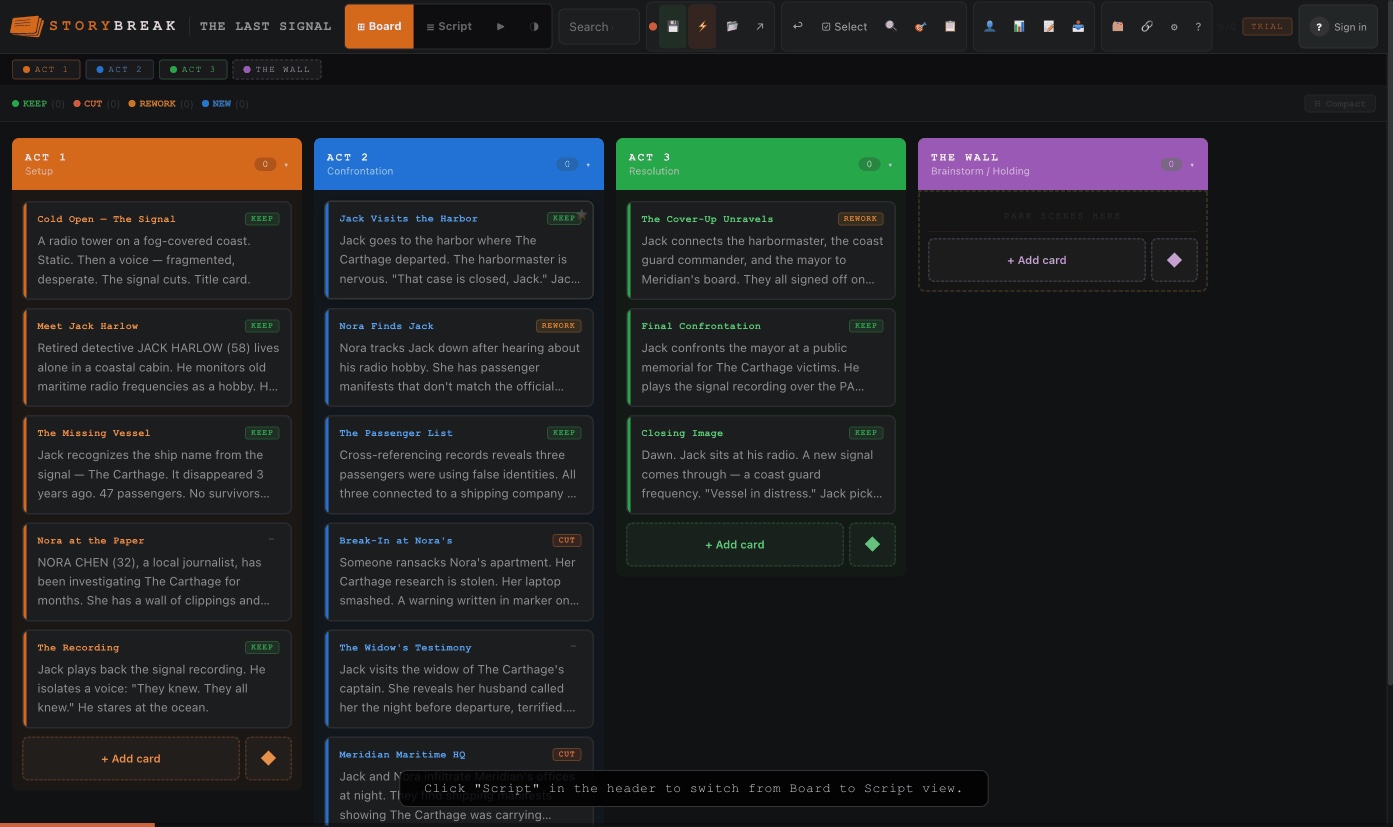
Drag scenes between acts, mark what works, track every thread. Board view to think, Script view to build.
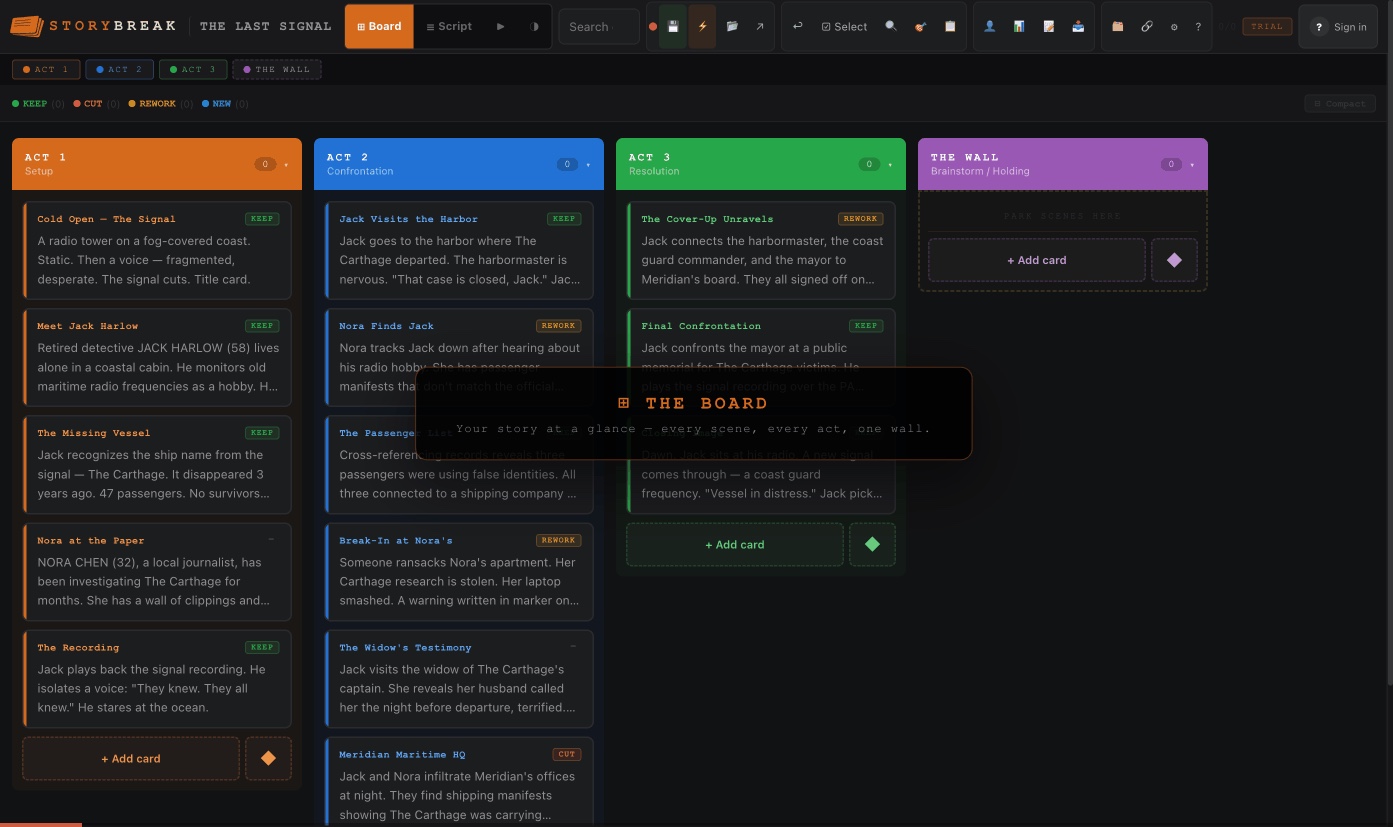
Every card is a scene. Every column is a timeline. Drag to rearrange. Think visually.
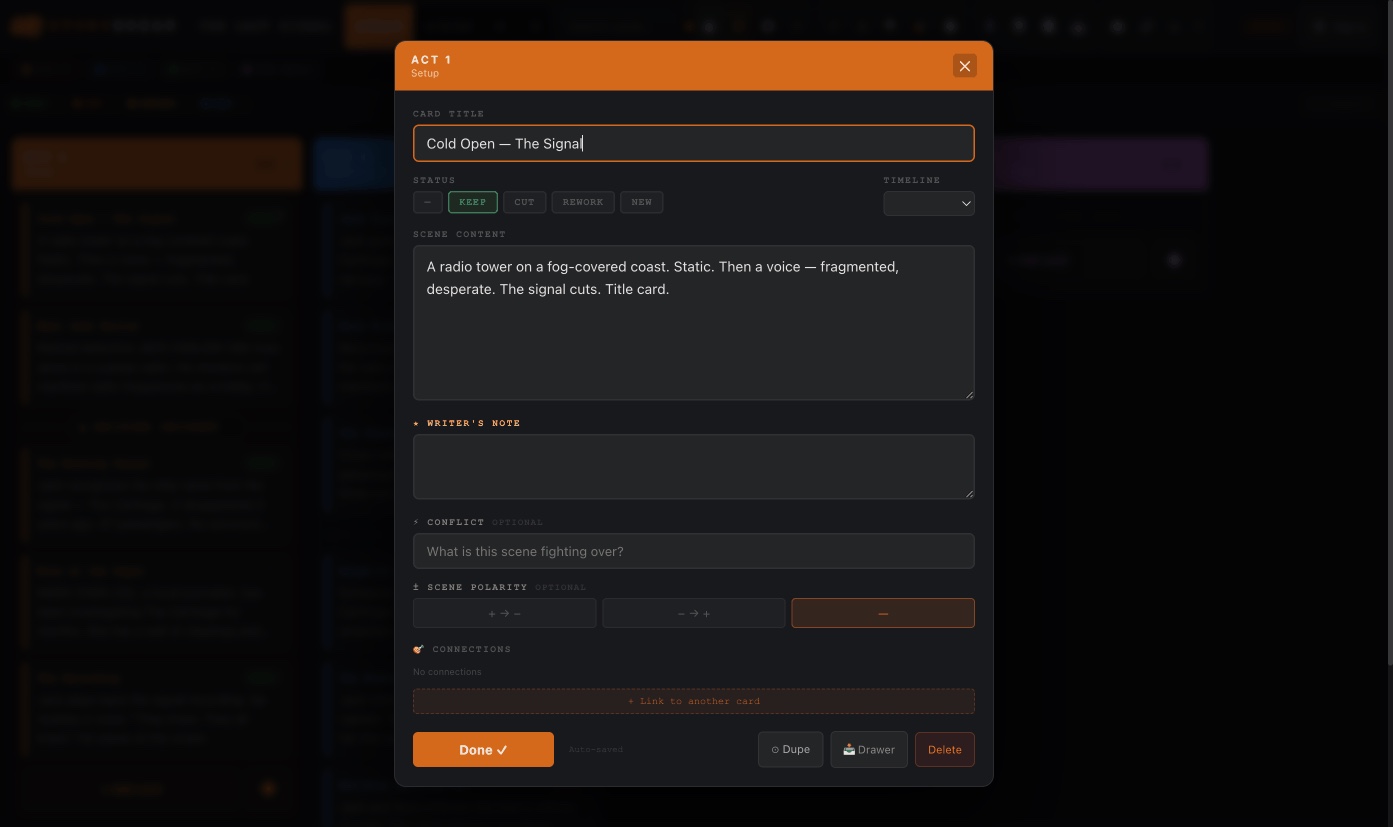
Title, scene content, notes, conflict, connections. Everything about the scene lives here.
Drop structural beats from four systems: 3-Act, Save the Cat, Hero's Journey, and TV.
Same cards, linear order. The sequence your audience experiences. Drag to reorder.
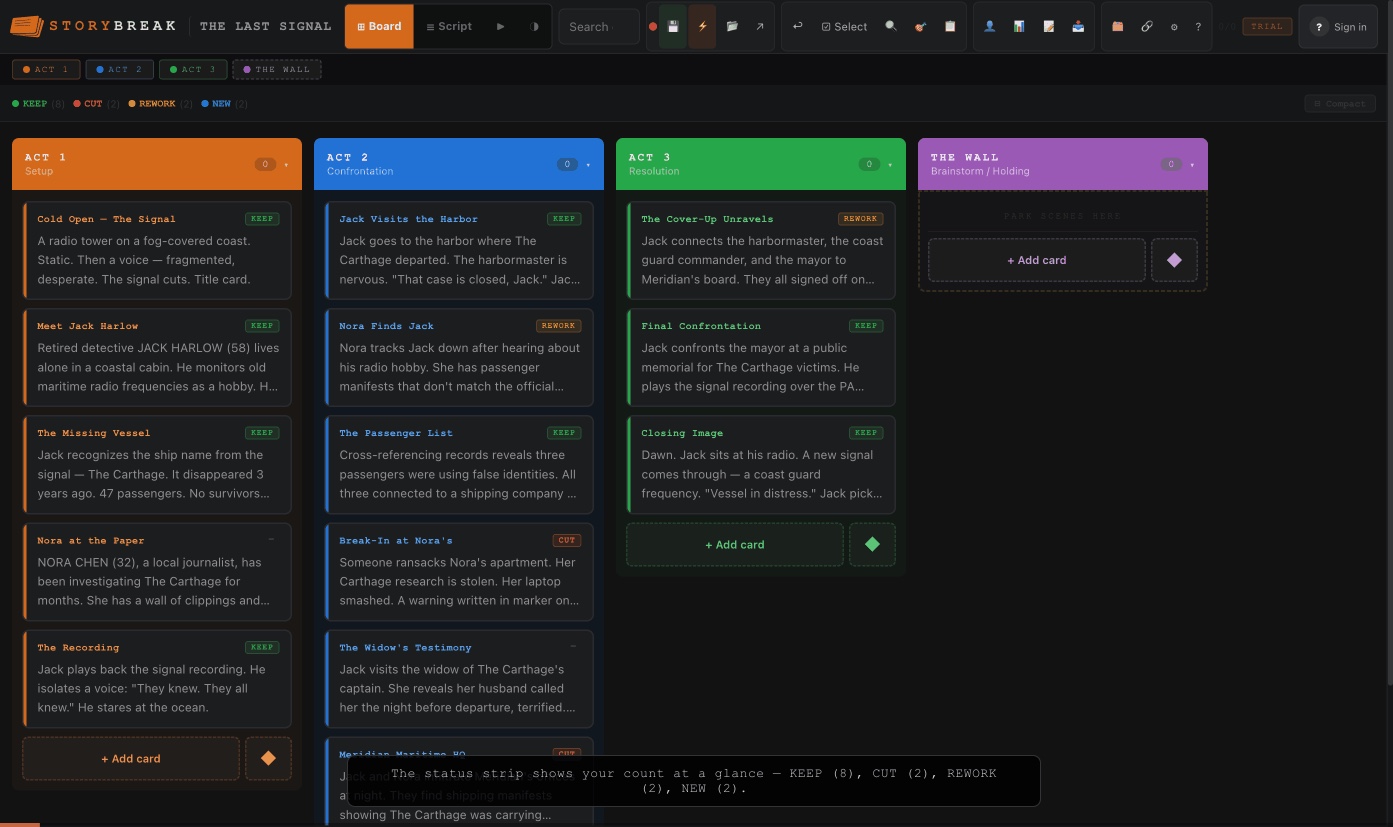
Tag every scene KEEP, CUT, REWORK, or NEW. See your count at a glance. Edit without deleting.
Every writer knows the ritual. Cards spread across a table, a wall, a floor. Scenes rearranged until the structure finally clicks into place. It's the most natural way to think about story.
Final Draft buries this under a word processor. Milanote is a generic board that has no idea what a midpoint is. Scrivener requires a weekend to learn.
StoryBreak does one thing: gives you a corkboard that understands screenplay structure: beats, acts, character arcs. Without getting in the way of the writing.
"The corkboard is where the movie lives before it becomes a script. Don't skip it."
Sign up in seconds. Email, Google, Discord, or Facebook. Free account, no credit card. Your projects sync automatically so your story is always there on any device, any browser.
Add scene cards, write what happens, drop in structural beat markers, tag characters, set statuses. Drag everything around until the structure feels right. Or paste in an existing script and let StoryBreak auto-detect your scenes and beats.
When the structure clicks, export to Fountain and open in Final Draft, Highland, or WriterDuet. Or export a treatment, story bible, CSV, or plain text. Your corkboard becomes the roadmap for your first draft.
Free account. No install. Every tool a screenwriter needs to build structure before they write a word.
Each card holds a scene title, scene content, writer's notes, a status tag, and character labels. Everything you'd write on a physical card, plus search, filtering, and unlimited undo.
FREEThree-Act Structure (11 beats), Save the Cat (all 15 beats), TV Structure (cold open through cliffhanger), and Hero's Journey (all 12 stages). Drop any beat marker between any cards.
FREEWriting a TV pilot and a feature at the same time? Switch between projects instantly from the Projects panel. Each project saves separately and stays right where you left it.
FREESign in and your projects follow you everywhere. Open on any device, any browser. Your full corkboard is always there. Your data is yours, secured with row-level encryption.
FREEHit Share and StoryBreak generates a single link with your entire project inside it. Open it on any device. Your full corkboard loads instantly for anyone you share it with.
FREEPaste any Fountain script, numbered outline, or chapter list. StoryBreak reads the scene headings, act breaks, and structural keywords, turning them into cards and beat markers automatically.
PROCreate a character and StoryBreak auto-detects their name every time you write it. Filter the board to any character and instantly see every scene they appear in. Spot gaps, imbalances, and scenes where a subplot character disappears for thirty pages.
PROFountain, Plain Text, CSV, HTML Treatment, Act Storybreak, and Story Bible. Print physical index cards in three sizes. Export a PDF-ready treatment for producers and development meetings.
PROLink any two cards as Setup & Payoff, Plant & Reveal, or Foreshadow & Callback. Color-coded tags appear on each card so you can track every thread at a glance. No tangled lines.
PROPush a live view of your board to any screen. AirPlay, HDMI, or a second monitor. Work in the editor while your writing partner or team watches every change happen in real time. Hover a card and it lights up on screen. Type a new line and they see it instantly. Like Google Docs for your corkboard.
PRODrop beat markers between your scene cards to map your story against any structural system, or mix and match across all four.
| FEATURE | FINAL DRAFT | MILANOTE | SCRIVENER | STORYBREAK |
|---|---|---|---|---|
| Price | $100 | $12.50/mo | $60 | Free / $9/mo |
| Dedicated corkboard | ✕ | ✓ | ✓ | ✓ |
| Understands screenplay structure | ✓ | ✕ | ✕ | ✓ |
| Beat markers (4 systems) | ✕ | ✕ | ✕ | ✓ |
| Auto-detect beats on import | ✕ | ✕ | ✕ | ✓ |
| Auto character tracking | ✕ | ✕ | ✕ | ✓ |
| Story connections (setup → payoff) | ✕ | ✕ | ✕ | ✓ |
| Live presentation mode | ✕ | ✕ | ✕ | ✓ |
| Projects sync across devices | ✕ | ✓ | ✕ | ✓ |
| Lifetime option available | ✓ | ✕ | ✓ | ✓ |
| Steep learning curve | ✓ | ✕ | ✓ | ✕ |
Free account forever with core features. Upgrade when you're ready, or don't. Your work is always yours.
Every feature in StoryBreak was built by one person. No VC funding. No team. Just the tool, and the belief that writers deserve something built for the way they actually work.
I was developing a feature film with three separate timelines that had to weave together. A present-day story, a past story, and a subplot, plus a whole layer of backstory that may or may not make the final cut. I needed to see all of it at once, lay out every beat, and figure out how they fit together before I wrote a single page of script.
So I did what writers do. Bought index cards, markers, and a foam core board. Started writing every scene point and beat on its own card and pinning them up by timeline. It worked for about an hour. Then I realized I was going to be hand-writing hundreds of cards, and every time the story changed I'd be back on my feet rewriting and repinning everything from scratch.
What I needed was the same thing, just virtual. Three timelines running side by side. A fourth for backstory and the scenes I wasn't sure about yet. The ability to drag cards around instantly, update a beat in two seconds, and then collapse all four timelines into one master sequence to see the whole story in order.
I looked for that tool. Nothing did exactly what a physical corkboard does, just without the board. So I built it myself. That's StoryBreak. Four timelines, one script view, full flexibility, no install. Exactly what I needed, and now it's yours too.
- JOSH, CREATOR OF STORYBREAK
Drop your email. We'll send you a code for 3 free months of Pro when you sign up, plus monthly updates on new features. No spam.
StoryBreak works as a full app on your iPad through Safari. No App Store needed.
1. Open storybreak.app in Safari
2. Tap the Share button (square with arrow)
3. Scroll down and tap Add to Home Screen
4. Tap Add
It launches fullscreen, works offline, and feels native. Your projects sync automatically.
Start free. No credit card. When you're ready to go all in, Pro is $9/month.